

ICT Macros

Updated August 14, 2026

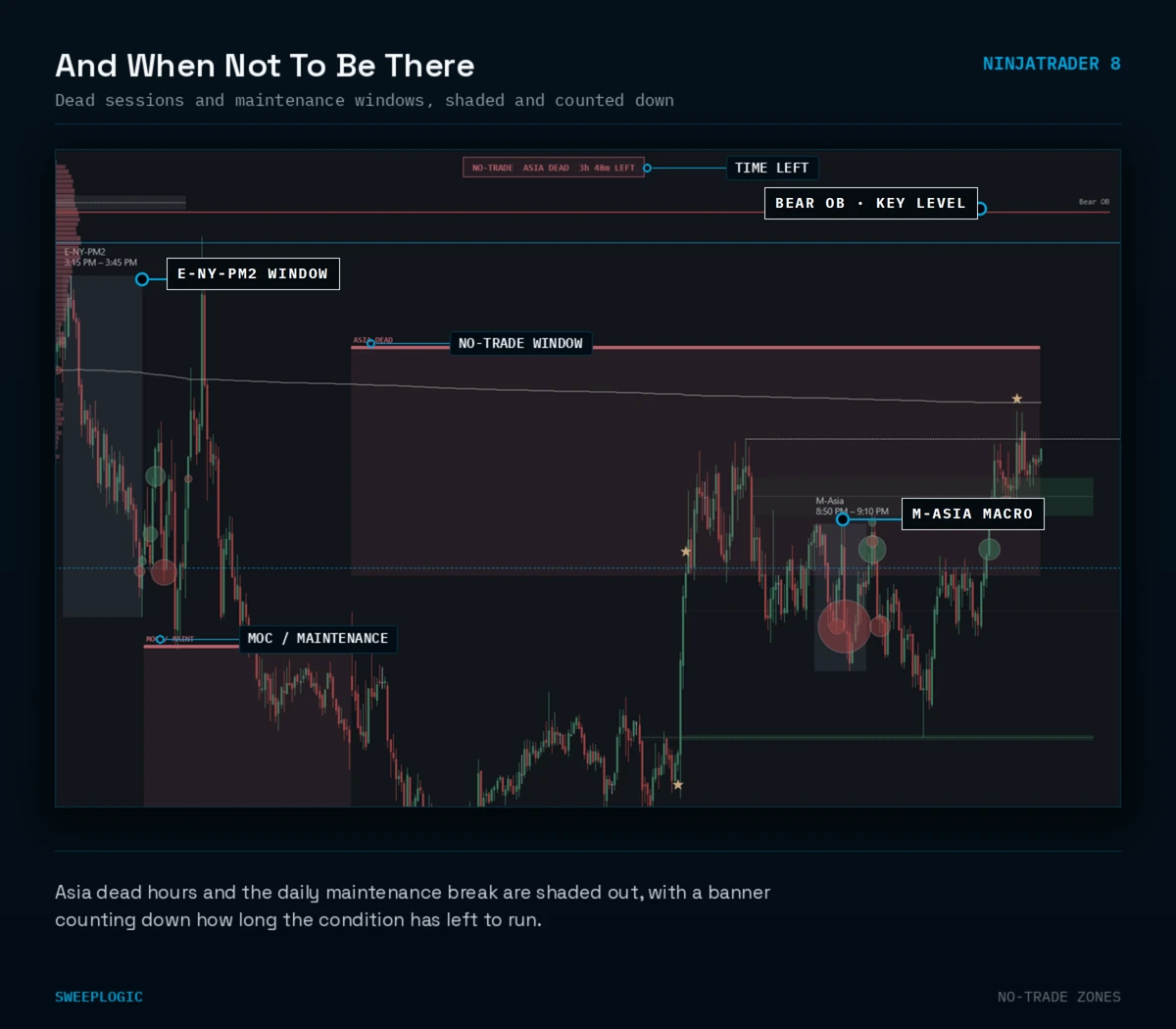
Macros are about timing, not price. The moves that matter cluster inside specific windows, and if you’re watching the wrong clock — or off by an hour after a DST change — you miss them or fade them late. Manually tracking a dozen windows across sessions is impractical; Macros keeps them on-screen and on-time. Shades the ICT session macro windows across Asia, London, NY AM, Midday, and NY PM directly on your chart, with DST-aware timezone handling so the windows land at the right time year-round. Tells you about do-not-trade zones directly on your chart so you know when to stay out of the chop.

★★★★★ 5.0 out of 5 Read all 4 reviews ↓

$99.00

Lifetime License · Instant Download

Watch Video About the Indicator

Trading Concepts You'll Use

Killzones (Asia / London / NY AM / NY PM)
Manipulation / Accumulation / Expansion
Liquidity Sweeps
Displacement
Session Timing
Market Maker Delivery
Intraday Timing Windows
No-trade time periods

Features

9 macro windows across Asia, London, NY AM, and NY PM
Phase labeling — manipulation, accumulation, expansion — color-coded per window
Pre-macro swing sweep detection on window entry
ATR-based displacement filter with configurable multiplier
Dead zone locking behavior and chop prevention
Session master toggles plus per-macro enable, start, and end
Per-macro color override and full-panel display toggle
DST-aware New York timing on every window
Alerts on window entry and on first completed bar
Session-dated draw tags — history preserved, no overwrite
Traders who trade by the ICT clock
ICT practitioners waiting for macro window
Traders who need timing, not more price line
Anyone who misses the big directional move frequently
Traders who ignore time-of-day entirely
Anyone unwilling to learn the system
Anyone who gets caught in choppy price action
Traders who force setups in dead zones

What You Get

$99

$49

$49

$49

$99

$345

$99.00

7-Day Money-Back Guarantee

Install it. Run it on your charts. Test it on live or sim. If it doesn't sharpen your edge in 7days, email us for a full refund — no friction, no forms, no
questions. The risk is on us.

Common Questions

What is a macro window?
A short, recurring block of time — roughly the ten minutes before the hour through the ten minutes after — when algorithmic activity tends to concentrate. The idea is that price seeks liquidity and rebalances on a schedule, and these windows are where that activity is most visible. The indicator marks them on your chart so you’re aware you’re inside one before you take the trade, not after.
Which windows does it cover?
The full set across Asia, London, New York AM, midday and New York PM — not just the two everyone quotes. Each session has its own master toggle and every individual macro can be turned on, off, or retimed independently. If you only trade one window, run one; if you want the whole day mapped, it’s there.
Are the times fixed, or can I set my own?
Both. Every macro ships with its standard start and end and each one is editable, so you can shift a window to match your own testing or add the timing your mentor teaches. Nothing is hardcoded into logic you can’t reach.
Will the times be right in my timezone, and does it handle DST?
Yes. All windows are derived in Eastern Time with daylight saving handled automatically, independent of your chart’s display timezone. This matters more than it sounds — most CME session templates run on Central Time, which puts an hour between what you expect and what you get if the indicator trusts the chart clock. This one doesn’t.
Does it just draw boxes, or does it tell me something happened?
It reads what occurs inside the window. A liquidity sweep against a recent swing, a displacement candle sized against volatility rather than a fixed point value, and a fair value gap forming in the window are each detected and flagged — so you can distinguish a macro that ran and did nothing from one that swept and displaced. Alerts fire on window entry and on the first bar inside, so you’re notified before the move, not during it.
How do I actually trade off it?
You don’t trade the box. It’s a timing filter: it tells you when your setup is more likely to be acted on, and when you’re taking a trade in dead time between windows. Traders typically pair it with a level source — Key Levels, Order Blocks, or an FVG — and take the setup only when the level and the window line up.

Ready to add this indicator to your stack?

Instant download. Lifetime license. 7-day money-back guarantee.

Write a review

Scroll to Top

Watch Video About the Indicator